Extending the functionality of the fiscal registrar
v6 Introduction
The commands of the fiscal registrar can be supplemented with any other operations. For example, if preliminary work needs to be done before printing the payment receipt for an order or performing operations after printing this receipt. Schematic representation can be shown as follows:
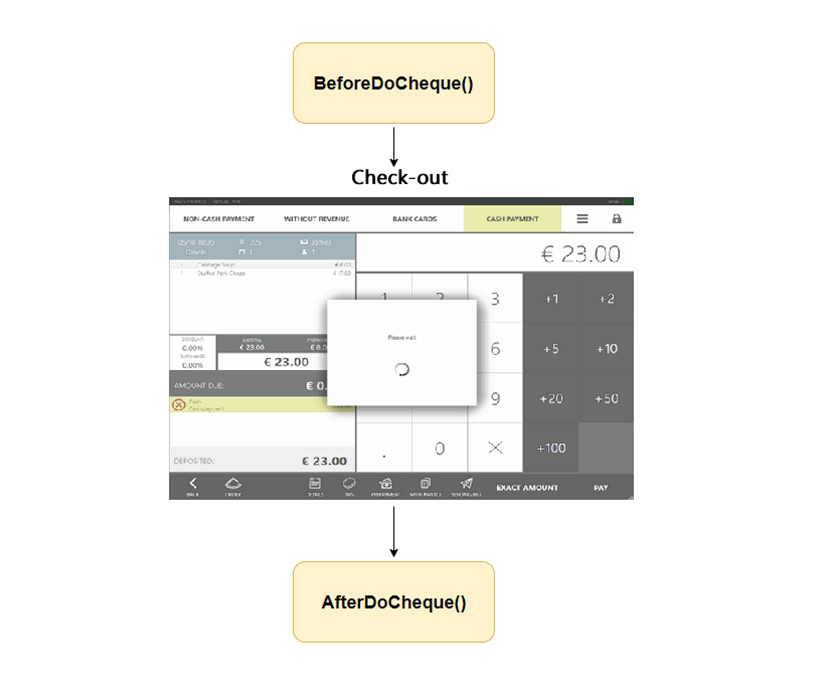
If the plugin needs to gain control during the printing of the fiscal payment receipt or order return, as well as during the processes of deposit, withdrawal, printing X and Z reports, it is sufficient to implement the interface IChequeTaskProcessor and register it by calling the API method RegisterChequeTaskProcessor():
var chequeTaskProcessor = new ChequeTaskProcessor()
PluginContext.Operations.RegisterChequeTaskProcessor(chequeTaskProcessor);
All commands of the interface IChequeTaskProcessor can interrupt the execution of the main operation: fiscalization of the receipt, deposit, withdrawal, printing X and Z reports. To do this, an exception of any kind must be thrown in the command body.
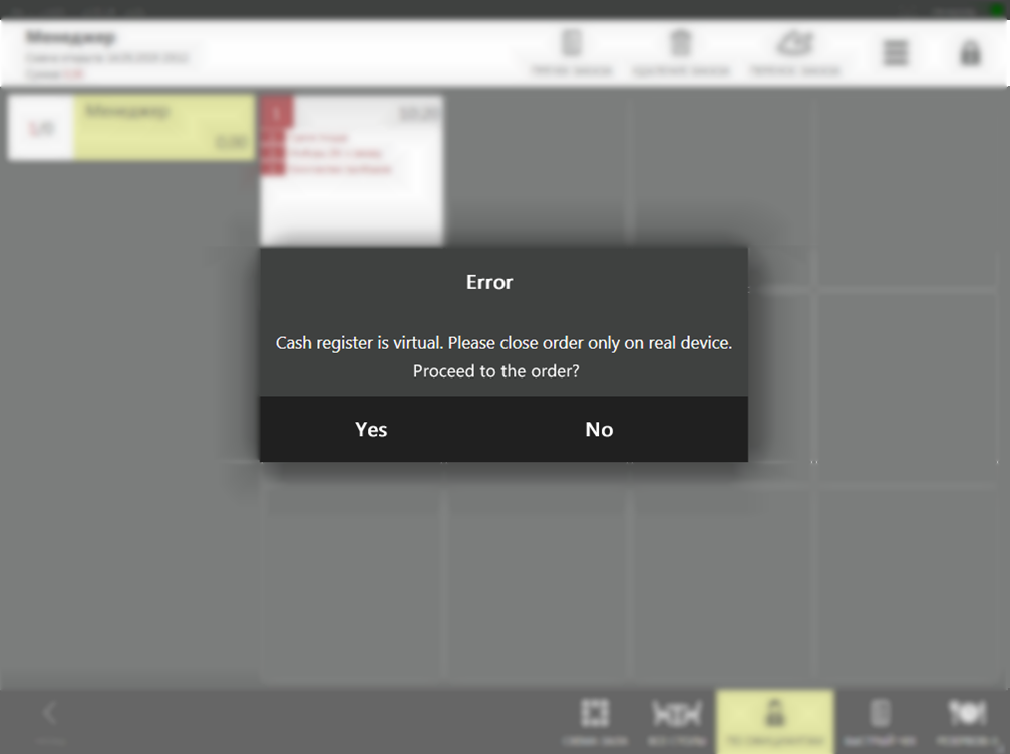
For example, let’s set a condition — orders cannot be closed on a virtual fiscal registrar (FR):
public BeforeDoCheckActionResult BeforeDoCheckAction(ChequeTask chequeTask, ICashRegisterInfo device, CashRegisterChequeExtensions chequeExtensions, IViewManager viewManager)
{
	// For example: allow printing payment and prepayment receipts only on a real device.
	if (device.IsVirtual)
		throw new Exception("Cash register is virtual. Please close order only on real device.");

	PluginContext.Log.InfoFormat("Before do cheque on cash register: {0} ({1})", device.FriendlyName, device.Id);

	...
}
Then, when paying for an order on a virtual FR SyrveFront, an error message will be displayed and the order will remain open:
An example of implementing the interface IChequeTaskProcessor and its registration can be found in the SDK SamplePlugin project.
Interface IChequeTaskProcessor
Let’s take a closer look at the commands of IChequeTaskProcessor.
1. BeforeDoCheckAction
BeforeDoCheckAction() - a command that is executed before the fiscalization of the receipt. This can be closing an order, returning an order, pre-check, canceling a pre-check, returning goods.
Its main purpose is to check the possibility of performing the operation and to add additional information to the receipt.
How to add additional information to the receipt?
There are 2 ways to add additional information to the receipt:
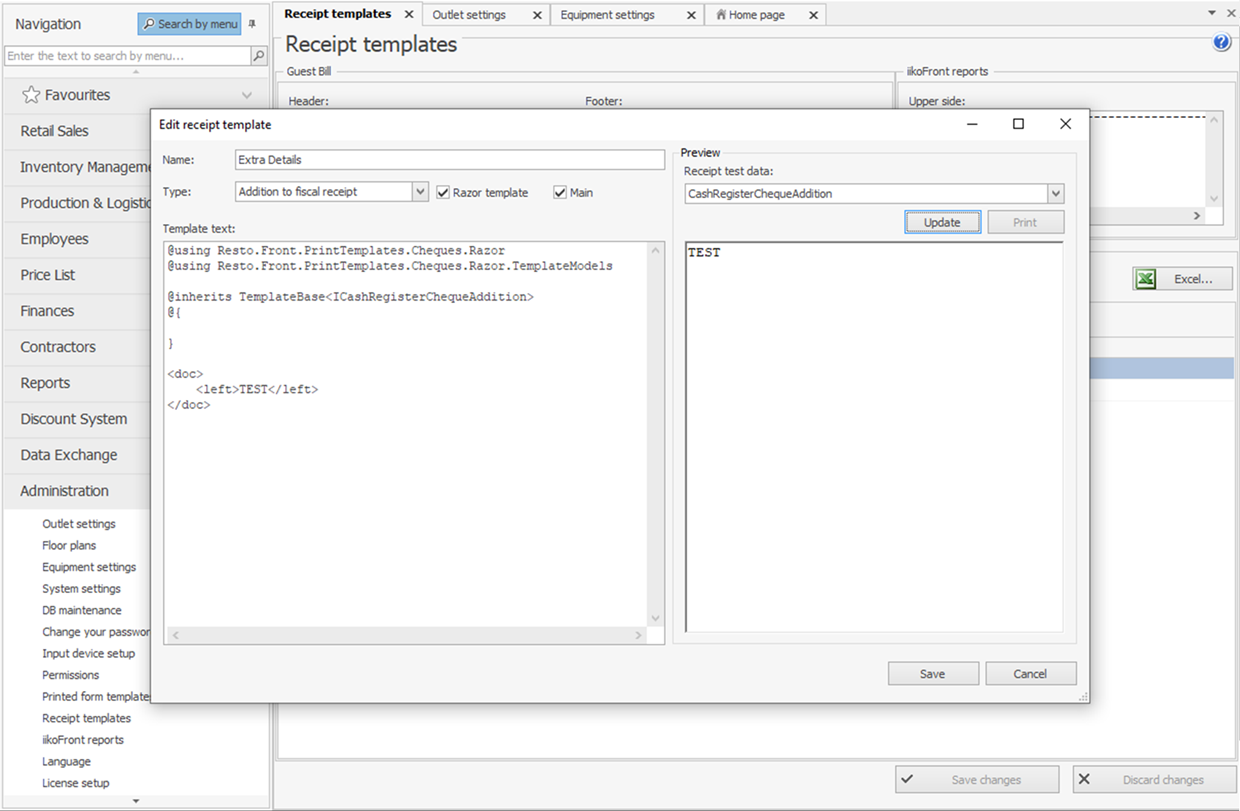
- By adding a receipt template “Supplement to the fiscal receipt”: Syrve Office => “Administration” => “Receipt Templates” => “Add” => “Type: Supplement to the fiscal receipt”.
The template written here will be added to the end of the receipt
chequeTask.TextAfterCheque. This method is not related to extending the functionality of the FR, and using it does not require registering your ownIChequeTaskProcessor.
- The plugin has the ability to add its values to
chequeTask.TextBeforeCheque,chequeTask.TextAfterCheque, as well as change the cashier’s namechequeTask.cashierName. This data will be sent to the FR for printing. To do this, it is necessary to fill in the corresponding fields in the returned value of typeBeforeDoCheckActionResult. If modification of the fields is not required, simply return null.public BeforeDoCheckActionResult BeforeDoCheckAction(ChequeTask chequeTask, ICashRegisterInfo device, CashRegisterChequeExtensions chequeExtensions, IViewManager viewManager) { var beforeCheque = new List<Data.Print.Document>(); var documentBefore = new Data.Print.Document(); documentBefore.Markup.Add(new XElement(Tags.LargeFont, "Welcome")); documentBefore.Markup.Add(new XElement(Tags.SmallFont, "tel. 555-123456")); beforeCheque.Add(documentBefore); var afterCheque = new List<Data.Print.Document>(); var documentAfter = new Data.Print.Document(); documentBefore.Markup.Add(new XElement(Tags.SmallFont, "Thank you for shopping")); documentBefore.Markup.Add(new XElement(Tags.QRCode, "syrve.com")); beforeCheque.Add(documentAfter); return new BeforeDoCheckActionResult { BeforeCheque = beforeCheque, AfterCheque = afterCheque, CashierName = "CashierName" }; }
The arguments of the function BeforeDoCheckAction():
chequeTask— information about the order. All information about the order items, discounts/surcharges, payments, and more (see the article API external fiscal registrars).device— information about the fiscal registrar on which the order is being closed.chequeExtensions— additional information about the receipt. It stores markup for adding to the beginning and end of the receipt (chequeExtensions.BeforeCheque,chequeExtensions.AfterCheque). It also stores the identifierchequeExtensions.PastOrderIdand the numberchequeExtensions.PastOrderNumberof the order closed in the previous CS. These fields are filled when returning an order from the previous CS.viewManager— window manager. It allows displaying a predefined set of dialog windows built into SyrveFront (see the article API dialog windows).
2. AfterDoCheckAction
AfterDoCheckAction() — a command that is executed after the fiscalization of the receipt.
Its main purpose is to perform final actions after printing the receipt. For example, to add an operation to the queue for uploading to an external system.
The argument result describes the result of the operation execution on the FR.
result.Success = true — the operation was successful, otherwise — failure.
If the operation was unsuccessful result.Success = false, the error text can be seen in result.Message.
3. BeforeXReport
BeforeXReport() — a command that is executed before printing the X-report.
As parameters, the fiscal registrar on which the operation is conducted, IViewManager for showing messages or entering data, and the user authUser initiating the printing of the X-report are also passed.
4. AfterXReport
AfterXReport() — a command that is executed after printing the X-report.
The arguments are similar to the command AfterDoCheckAction.
5. BeforeZReport
BeforeZReport — a command that is executed before printing the Z-report.
The parameters passed are: FR, user, and window manager IViewManager.
6. AfterPayIn
AfterPayIn — a command that is executed after depositing cash into the register.
The function receives: FR, the response from the fiscal registrar upon performing the deposit, window manager IViewManager, and the amount of cash deposited into the register.
7. AfterPayOut
AfterPayOut — a command that is executed after withdrawing cash from the register.
The function receives: FR, the response from the fiscal registrar upon performing the withdrawal, window manager IViewManager, and the amount of cash withdrawn from the register.
Additional Interfaces IReadonlyChequeTaskProcessor and IEditableChequeTaskProcessor
Along with the above-mentioned interface IChequeTaskProcessor, there are also extending interfaces IReadonlyChequeTaskProcessor and IEditableChequeTaskProcessor, which allow performing specific tasks before executing withdrawals and deposits at the cash register.
They are registered in exactly the same way as the parent interface.
The difference between them is that when using the interface IReadonlyChequeTaskProcessor, the plugin cannot edit the withdrawal amount during the withdrawal of funds, while using the interface IEditableChequeTaskProcessor — it can, due to the parameter ref estimatedSum.
This is done so that when closing the cash register, the plugin can adjust the withdrawal amount.