Templating with RazorEngine for Print Forms
v8 A new example SampleRazorRunner has been published, demonstrating the capabilities of using Razor markup in combination with data obtained from Resto.Front.Api.
This example features a static class RazorRunner, which contains 2 methods: UpdateRazorAssemblyReference and RunCompile.
UpdateRazorAssemblyReference(string restoApiAssemblyToUse, params string[] otherAssembliesToUse)- this method allows updating the list of assemblies whose content will be used for compiling the Razor template.- The first argument
restoApiAssemblyToUseis mandatory. The compiler needs to know which version of the API will be used. -
The second argument is optional. Additional assemblies should be specified if they contain any necessary data, methods, or models for the template, which the compiler does not initially have instructions to use. Several libraries will always be used, as they are necessary for the normal functioning of the compiler:
- mscorlib.dll
- netstandard.dll
- System.dll
- System.Core.dll
- RazorEngine.NetStandard.dll
- Microsoft.CSharp.dll
The method uses the
ExternalAssemblyReferenceResolverclass, which describes the process of updating assembly references for Razor.- The first argument
RunCompile(string template, object model)- this method is responsible for compiling the Razor template.template- the template as a string. The string can be written dynamically or loaded from files. The usual extension for a Razor template is .cshtml.model- a model object with a specified set of data.
It is worth noting that models for templates can be of two types:
- Static - in this case, the
modelis passed to the compiler. It may also be necessary to pass the name of the dll containing this model inUpdateRazorAssemblyReferenceinotherAssembliesToUse. - Dynamic - a dynamically created model is passed in the
modelfield. For example:new { OrderNumber = 27, OrderId = PluginContext.Operations.GetOrders().Last().Id }. However, when using this method for providing data, the Razor template must include type explanations for all passed data:(int)OrderNumber,(Guid)OrderId.
The example also features a simple window:
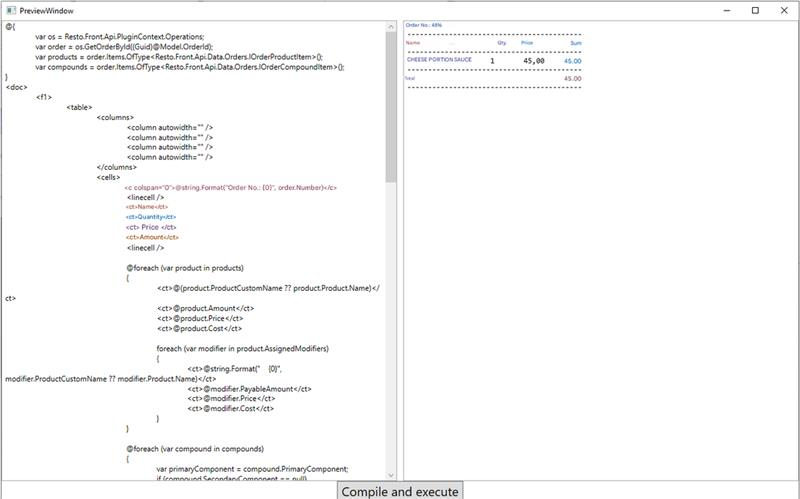
It allows dynamically setting the template and seeing the resulting output or error information. Initially, the SampleRazorRunner includes an example of Razor markup - RazorTemplateSample.cshtml. This example outputs some data about the open order.
If you want to use this mechanism in your plugin, you can reference the RazorRunner.cs file and specify the section about System.Runtime.CompilerServices.Unsafe in app.config.
When creating and using Razor templates for printing in Resto.Front.Api, it is important to know about the Syrve markup description language.
Below is a simple example of using this functionality:
using RestoRazorRunner;
using System;
using System.Linq;
using System.Xml.Linq;
using Resto.Front.Api.Data.Print;

namespace Resto.Front.Api.SamplePlugin
{
	public static class RazorRunnerSample
	{
		public static void RunCompileSample()
		{
			var os = PluginContext.Operations;

		    //Setting a simple Razor template
		    var razorTemplate = "@{" +
		    "\r\nvar os = Resto.Front.Api.PluginContext.Operations;" +
		    "\r\nvar order = os.GetOrderById((Guid)@Model.OrderId);" +
		    "\r\n}" +
		    "\r\n<doc>" +
		    "\r\n@string.Format(\"Order \u2116: {0}\", order.Number)" +
		    "\r\n</doc>";

		    var model = new SampleOrderModel { OrderId = os.GetOrders().Last().Id };

		    //Specifying which libraries need to be used.
		    RazorRunner.UpdateRazorAssemblyReference(
		    typeof(PluginContext).Assembly.ManifestModule.Name //Gets the currently used version of the API in the plugin
		    );

		    //Getting the compiled template
		    var result = RazorRunner.RunCompile(razorTemplate, model);

		    //Printing it through Resto.Front.Api
		    var printingDevice = os.GetPrintingDeviceInfos().Last();
		    os.Print(printingDevice, new Document { Markup = XElement.Parse(result) });
		}

		public sealed class SampleOrderModel
		{
			public Guid OrderId { set; get; }
		}
	}
}
Alternatively, instead of printing, you can obtain a fully formatted text using the operation FormatDocumentOnPrintingDevice.